Paul Graham wrote an article about wealth tax. In the article he 'models' the effect of a wealth tax on the fortune of a person. His assumption for the modeling is a person who earned a lot of money with a startup in her 20s. Paul Graham shows how much of the earned stocks/money would be taken by the government by a wealth tax.
Paul Graham comes to the conclusion that wealth taxes have "dramatic effects" and that "even a .5% wealth tax would start to keep founders away from a state or country that imposed it."
I think this conclusion is wrong. His model assumes that the earned money just lies on a big pile and is not used for 60 years. A more reasonable model would include interest being earn with the money. For this I will use an extended model:
(growth * (1-wealth_tax)^years
If we assume a reasonable return of investment of 2% per year the number shifts dramatically. Instead of "losing" 25% at 0.5% wealth tax you end up with 242% of your original value after 60 years. Even a wealth tax of 3% would only half your wealth.
Wealth Tax
Graham Model
With 2% Interest
0.10%
94.17%
308.99%
0.50%
74.03%
242.88%
1.00%
54.72%
179.52%
2.00%
29.76%
97.63%
3.00%
16.08%
52.76%
4.00%
8.64%
28.33%
5.00%
4.61%
15.12%
Paul Graham's article also misses to mention that a wealth tax only affect people with ALOT of money. Elizabeth Warren's "Ultra-Millionaire Tax" would only tax assets over $50 million. Once you are affected by a wealth tax you have enough money to live a luxurious life (and your children will probably never have to work to live). Most startup founders never reach this amount of wealth.
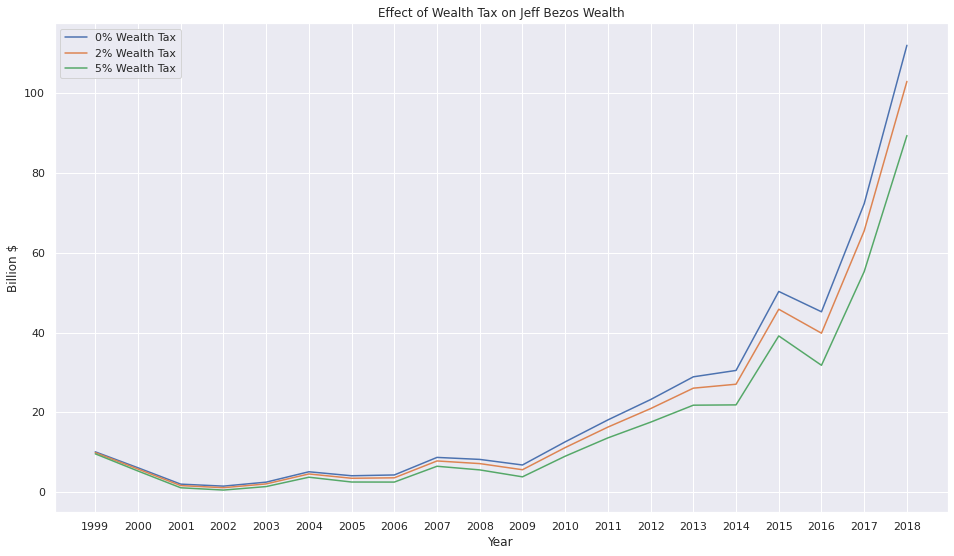
As this tax only targets the super rich let's look at the effect this tax would have on Jeff Bezos (data source: Wikipedia):
Even a high wealth tax of 5% leaves Bezos the majority of his wealth. If Bezos stopped earning new wealth in 2018 he could bequeath $30 billion to his children in 2080 with a 2% wealth tax. With a 5% wealth tax his children would still inherit over $4 billion!
The questions I'm asking myself when thinking about a wealth tax are the following:
Should a person have virtually unlimited resources for the rest of her life, just because she had a clever idea in her 20s?
Should children have virtually unlimited resources for the rest of their lives, just because one of their parents had a clever idea in her 20s?
Should grandchildren have virtually unlimited resources for the rest of their lives, just because one of their grandparents had a clever idea in her 20s?
Zum 1. Juli 2020 wurde in Deutschland, als Teil des Corona-Konjunkturpakets, die Mehrwertsteuer von 19% auf 16%, bzw von 7% auf 5%, gesenkt. Schon bei der Ankündigung der Senkung wurde spekuliert ob diese tatsächlich an den Verbraucher weitergegeben wird, oder ob das Geld in den Konzernen stecken bleibt.
Um zu überprüfen wie mit der Senkung umgegangen wird habe ich kurz nach der Ankündigung angefangen Preisdaten zu sammeln. Hierfür habe ich die Webseiten von 10 deutschen Unternehmen stichprobenartig beobachtet. Dabei wurde täglich der Preis aller gelisteten Artikel gespeichert (max 25000 Artikel pro Unternehmen). Beobachtet habe ich die Unternehmen:
Aldi Nord
Aldi Süd
BMW
Kaufland
Hornbach
Media Markt
Obi
Netto
Avocado Store
Whisky.de
Ich hätte gerne noch mehr Unternehmen beobachtet, jedoch ließen sich viele Webseiten nicht reibungslos auswerten. Insgesamt habe ich 3.228.617 Preise von 368.452 Produkten erfasst (Stand: 03.07.20).
Auswertung
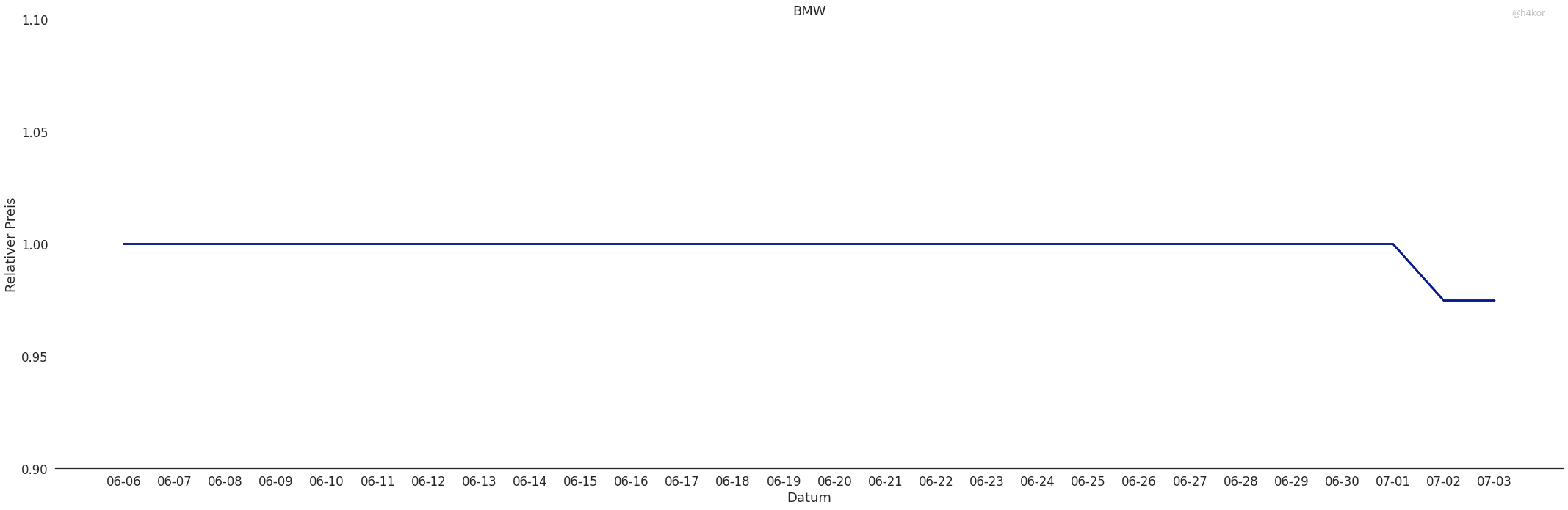
Als leichter Einstieg in die Auswertung dient die Preisentwicklung bei BMW. Die Preise bleiben konstant bis zum 2. Juli (da ich die Daten nachts erhoben habe kann es durchaus sein das die Preise schon am 1. Juli gesenkt wurden) und sinken dann um etwa 3% ab. Hier wurde die Mehrwertsteuersenkung direkt an den Kunden weitergegeben.
An diesem Graphen lässt sich die Visualisierung leicht erklären. Für jeden Artikel berechene ich täglich den "relativen Preis". Dafür gucke ich mir die Preise eines Artikels über den gesamten Beobachtungszeitraum an und nehme an das der "normale" Preis der am häufigsten vorkommende Preis ist. Dann werden alle Preise durch diesen normalen Preis geteilt um den relativen Preis zu bekommen. Auf diese weise lassen sich die Preise normieren, was Auswertung und Visualisierung deutlich vereinfachen.
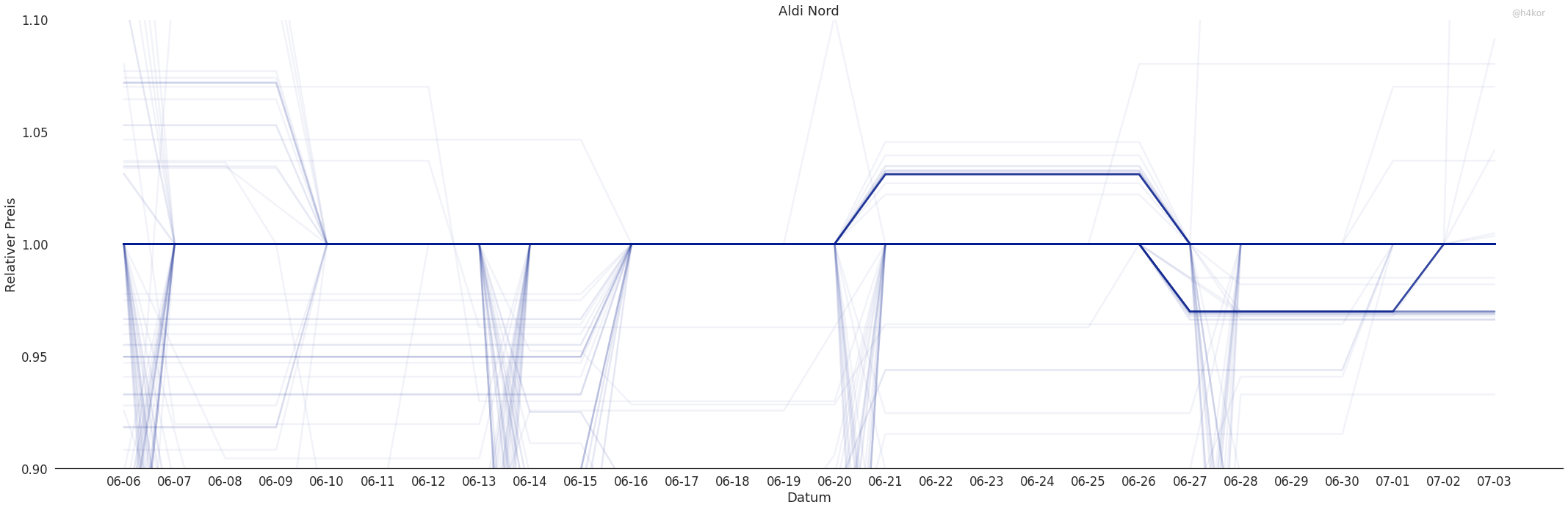
Etwas spannender wird das ganze schon bei Aldi Nord.
Hier kann man sehen das die Preise immer wieder abweichen. Die schwachen Linien ober und unterhalb der Hauptlinie zeigen Preisänderungen. Zu Beginn der Beobachtung sieht man Rabattaktionen in denen wenige Artikel günstiger sind als normalerweise. Das erste interessante Ereignis gibt es am 21.6. Hier werden viele Artikel ca. 3% teurer. Am 27.6 fallen all diese Artikel wieder auf ihr normales Niveau zurück und gleichzeitig werden andere Artikel ca. 3% billiger. Mit Beginn der der Mehrwertsteuersenkung werden die meisten Artikel wieder teurer und nur wenige bleiben um 3% reduziert.
Auf den ersten Blick sieht es so aus als würde Aldi Nord die Ersparnisse durch das Konjunkturpaket nicht an ihre Kunden weitergeben. Jedoch scheint sich Aldi Nord dafür entschieden zu haben nicht die Preise anzupassen, sonder einen Rabatt auf den Einkauf zu geben.
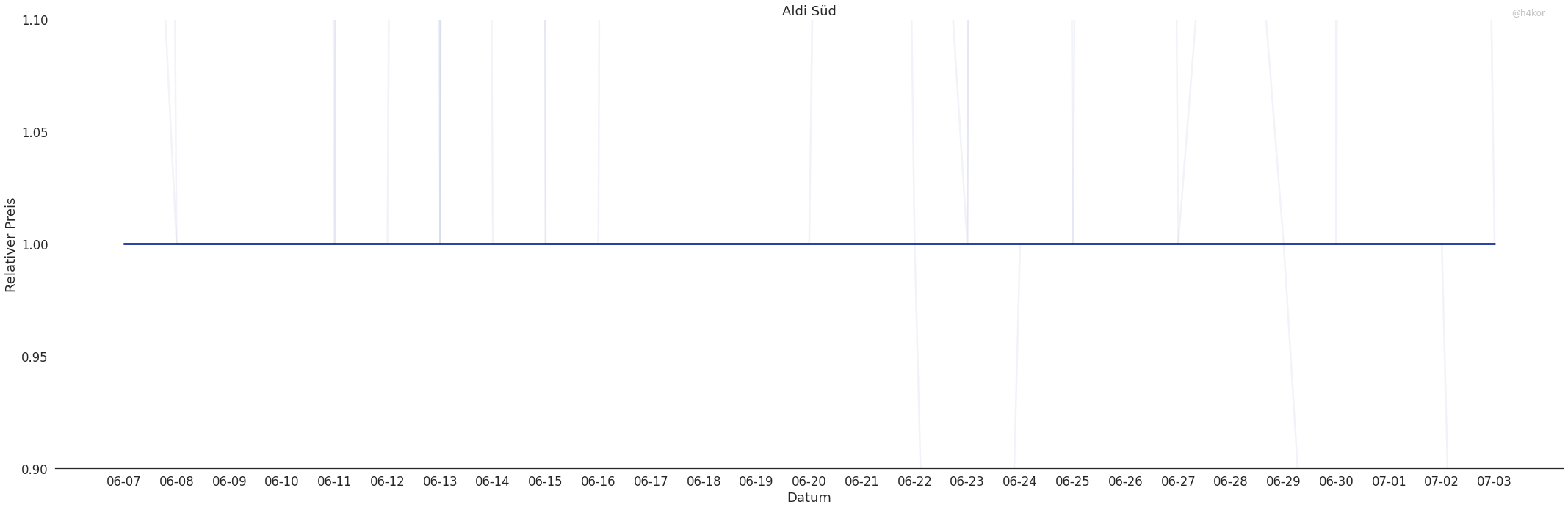
Ähnlich sieht es bei Aldi Süd aus. Hier gab es jedoch keine Preiserhöhung oder -senkung vor der Mehrwertsteuersenkung
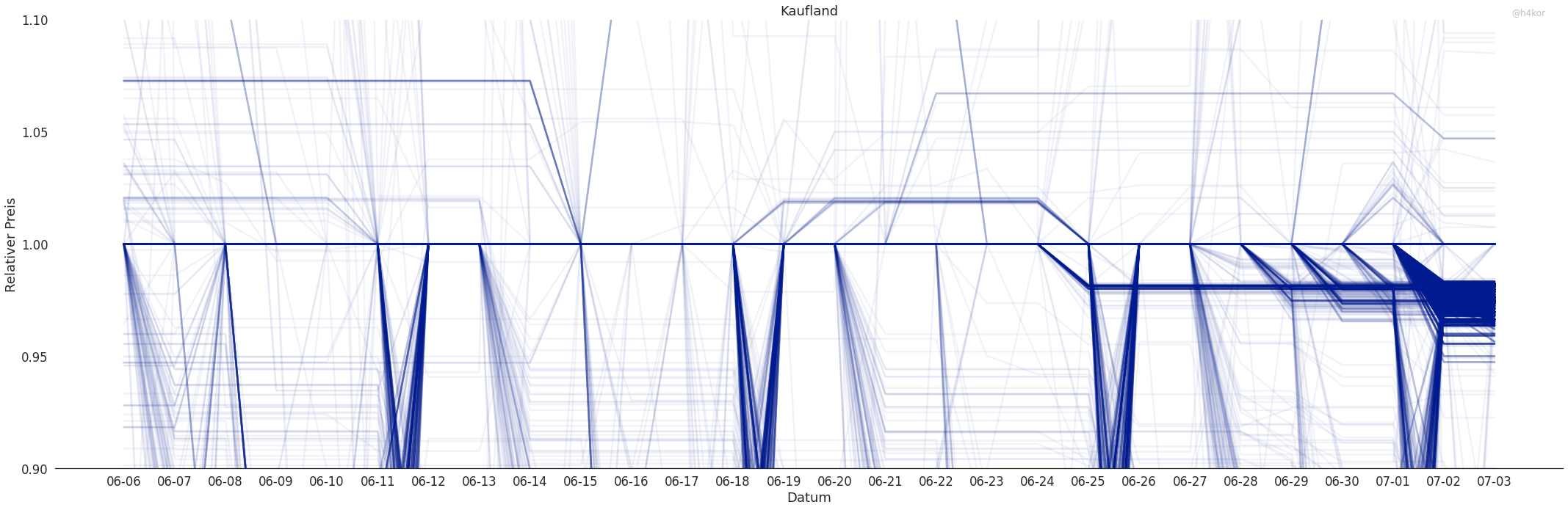
Der Konkurrent Kaufland hat sich scheinbar entschieden die Preise selbst zu senken.
Wenige Artikel wurden zwei Wochen vor der Senkung teurer, aber ein ähnlicher (schwächerer) Effekt lässt sich am Anfang der Beobachtung erkennen. Eine Woche vor der Senkung hat Kaufland schrittweise angefangen die Preise anzupassen, jedoch sind nicht alle Preise gesenkt worden. Hier wäre eine detailliertere Analyse notwendig um zu sehen um welche und wieviel Artikel es sich handelt.
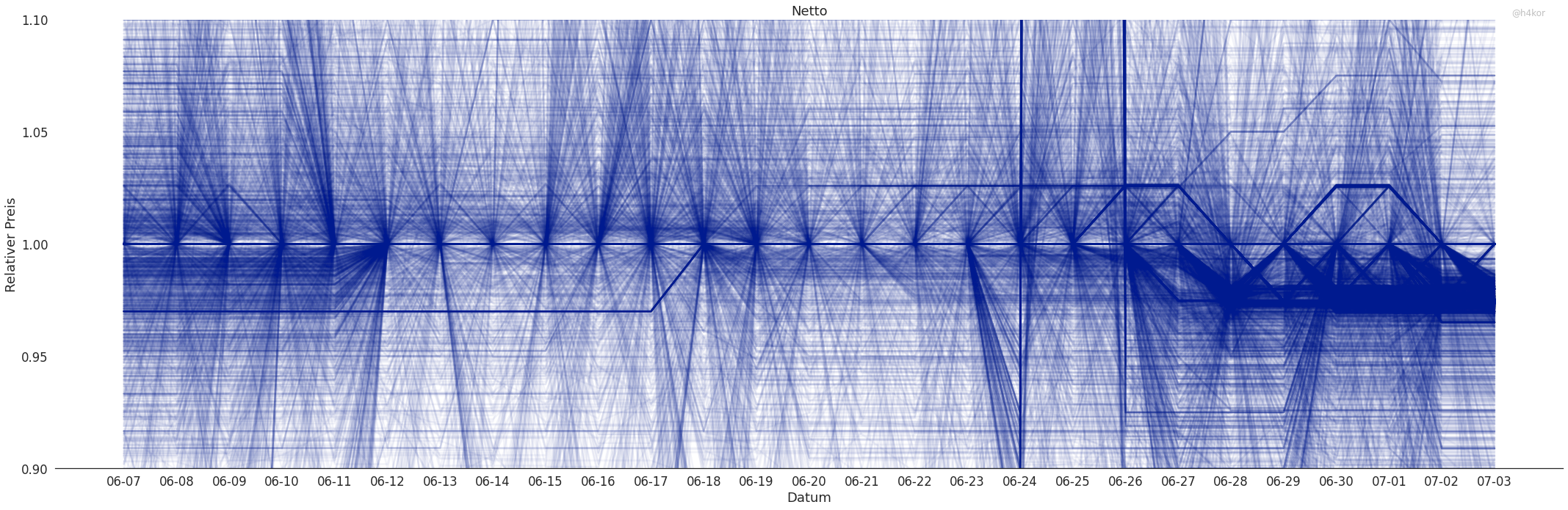
Deutlich chaotischer scheint es bei Netto zuzugehen.
Hier gibt es ständige Preisänderungen und Rabattaktionen die viele Artikel betreffen. Auch hier sieht man, dass ab dem 27.6 die Preise an die neue Mehrwertsteuer angepasst wurden. Auffällig hier sind die angehobenen Preise am 18.6 und die zum 27.6 immer dicker werdende Linie bei etwa 3%. Hier sollte noch etwas genauer nachgeguckt werden. Es könnte sein, dass hier Preise vor der Senkungen angehoben wurden.
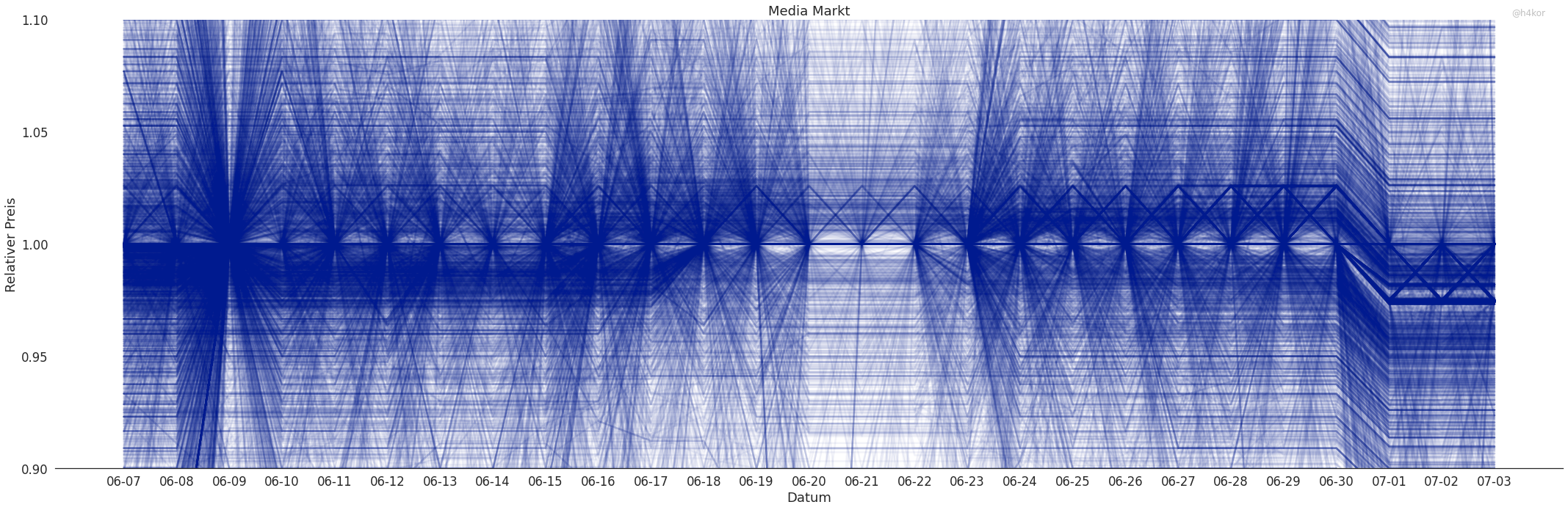
Der Preisgraph für MediaMarkt sieht ähnlich chaotisch aus.
Hier lässt sich direkt die Preissenkung am 1.7 erkennen. Scheinbar wurden hier pauschal alle Preise gesenkt. Auf den ersten Blick lässt sich auch nicht erkennen, dass Preise vorher erhöht wurden.
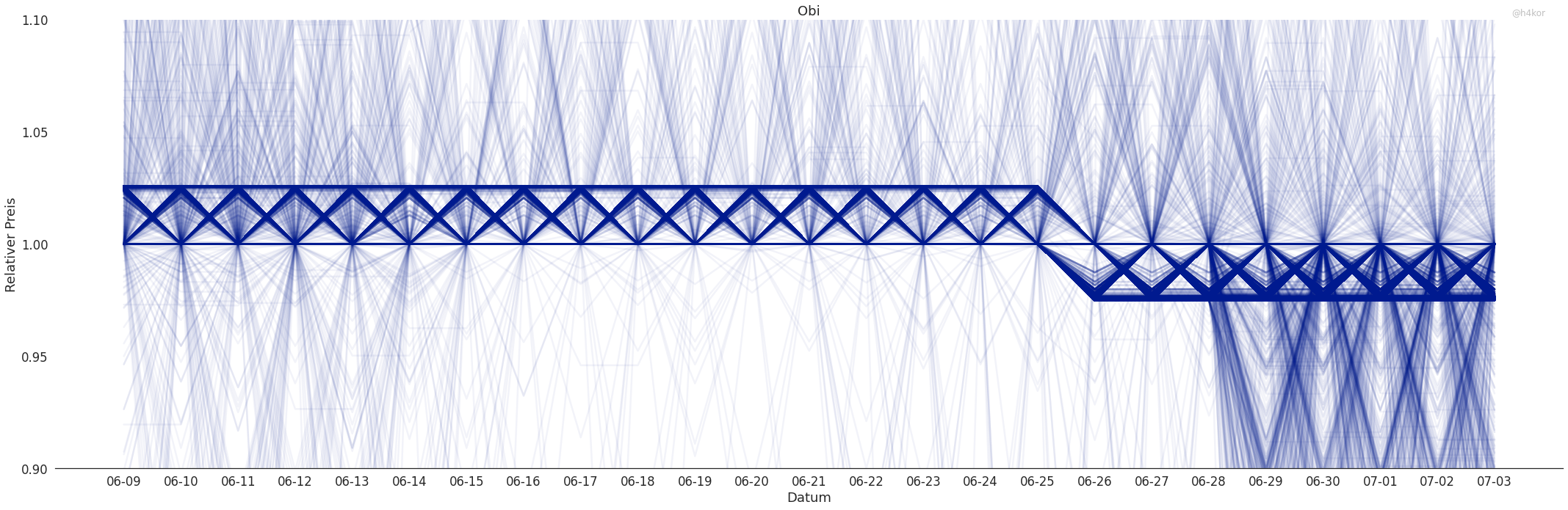
Bei OBI wurden die Preise schon am 25.6 gesenkt. Was es mit dem "Zick-Zack" Muster auf sich hat weiß ich noch nicht, es könnte aber ein Artefakt meiner Erhebung oder Visualisierung sein.
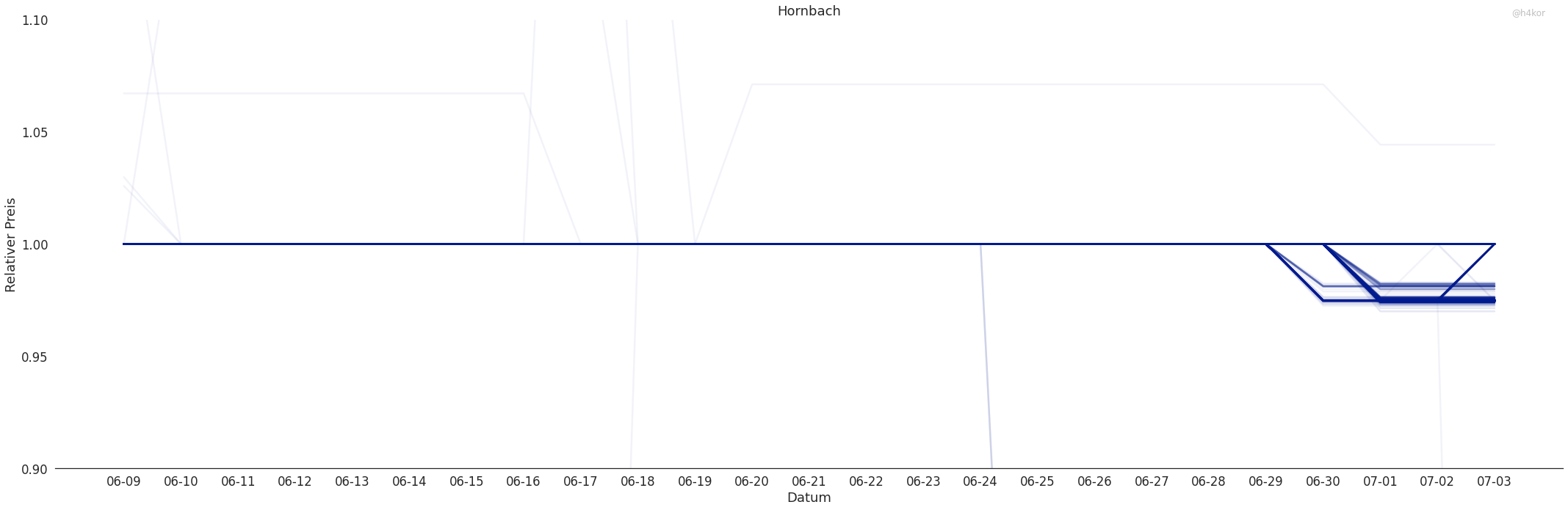
Bei Hornbach wurden viele Preise gesenkt aber bei weitem nicht alle.
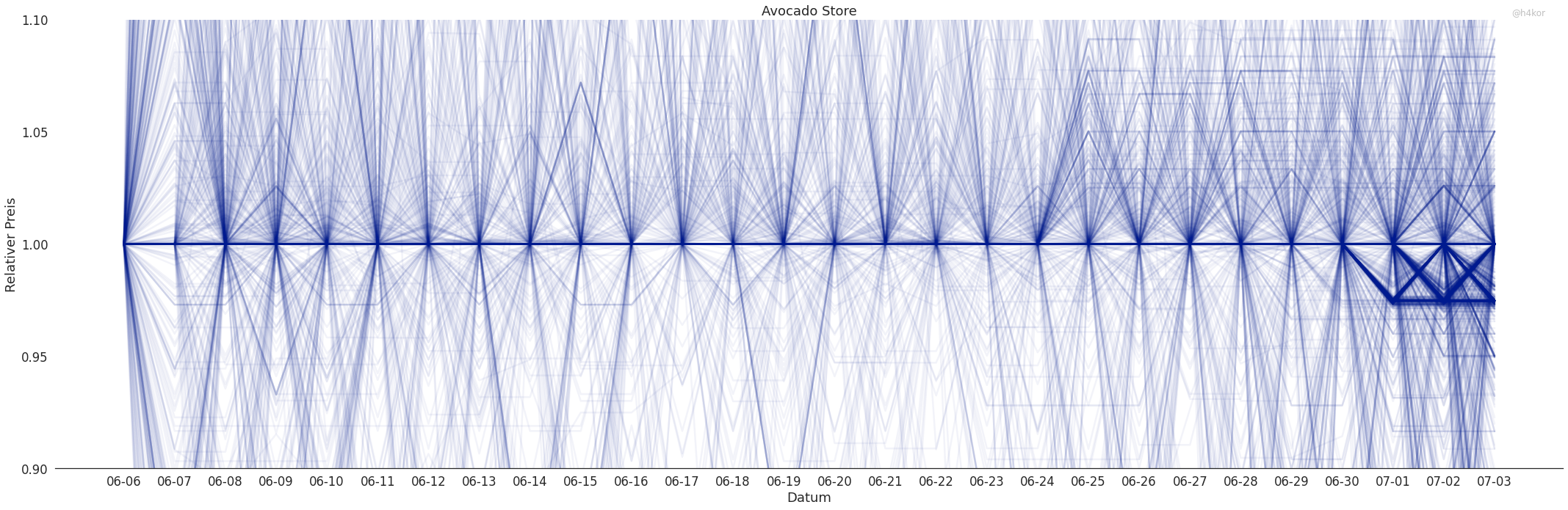
Bei Avocado Store handelt es sich um einen Marktplatz (ähnlich zu Amazon). Viele Anbieter können hier ihre Waren anbieten.
Einige Anbieter scheinen sich entschlossen zu haben die Preise zu senken. Auch hier zeigt sich ein leichtes "Zick-Zack" Muster (auch hier könnte es ein Artefakt meiner Erhebung oder Visualisierung sein). Hier wird interessant ob sich mit der Zeit mehr und mehr Anbieter entschließen die Senkung an den Kunden weiterzugeben. Ich weiß nicht wie viel Einfluss die Plattform selbst darauf hat.
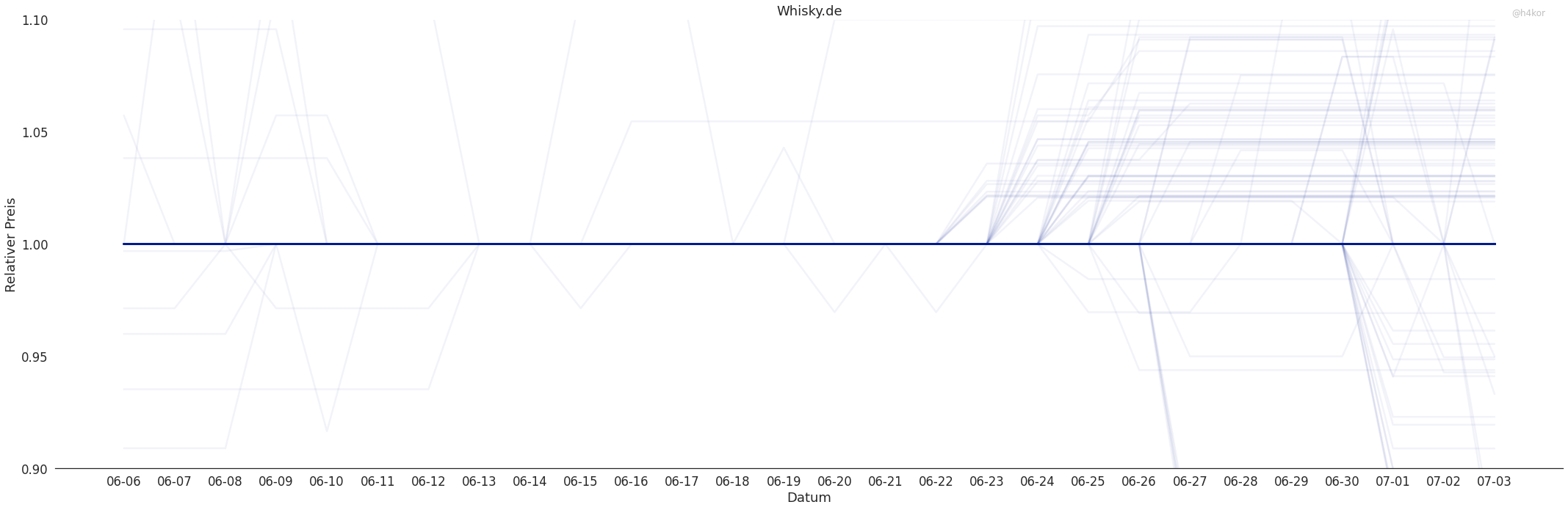
Whisky.de habe ich als Beispiel für ein spezialisiertes, kleines Unternehmen mit in die Analyse aufgenommen. Hier zeigt sich bis jetzt keine Senkung der Preise.
Insgesamt lässt sich sehen das die Mehrwertsteuersenkung an den Verbraucher weitergeben wird. An einigen Stellen sieht es noch so aus als wäre es nicht überall der Fall, aber dies sind bis jetzt nur Hypothesen die weiter untersucht werden sollten! Ich werde meine Scraper vorerst weiter laufen lassen und tiefer in die Daten eintauchen.
On deployment millions of projectiles are scatters in random orbits around the planet, taking out all satellites after a few hours.
The shrapnels will make launches from the attacked planet impossible for several decades.
Primarily used to lock down planets with offensive capabilities.
Prohibited by the New Geneva Convention, due to the high collateral damage