One of my favorite science fiction books. It plays in a world shortly before and after the AI singularity. I don't know how to describe it in a review without spoiling the journey, but I found many parallel to technologies and trends which should only emerge years after the publication of Accelerando.
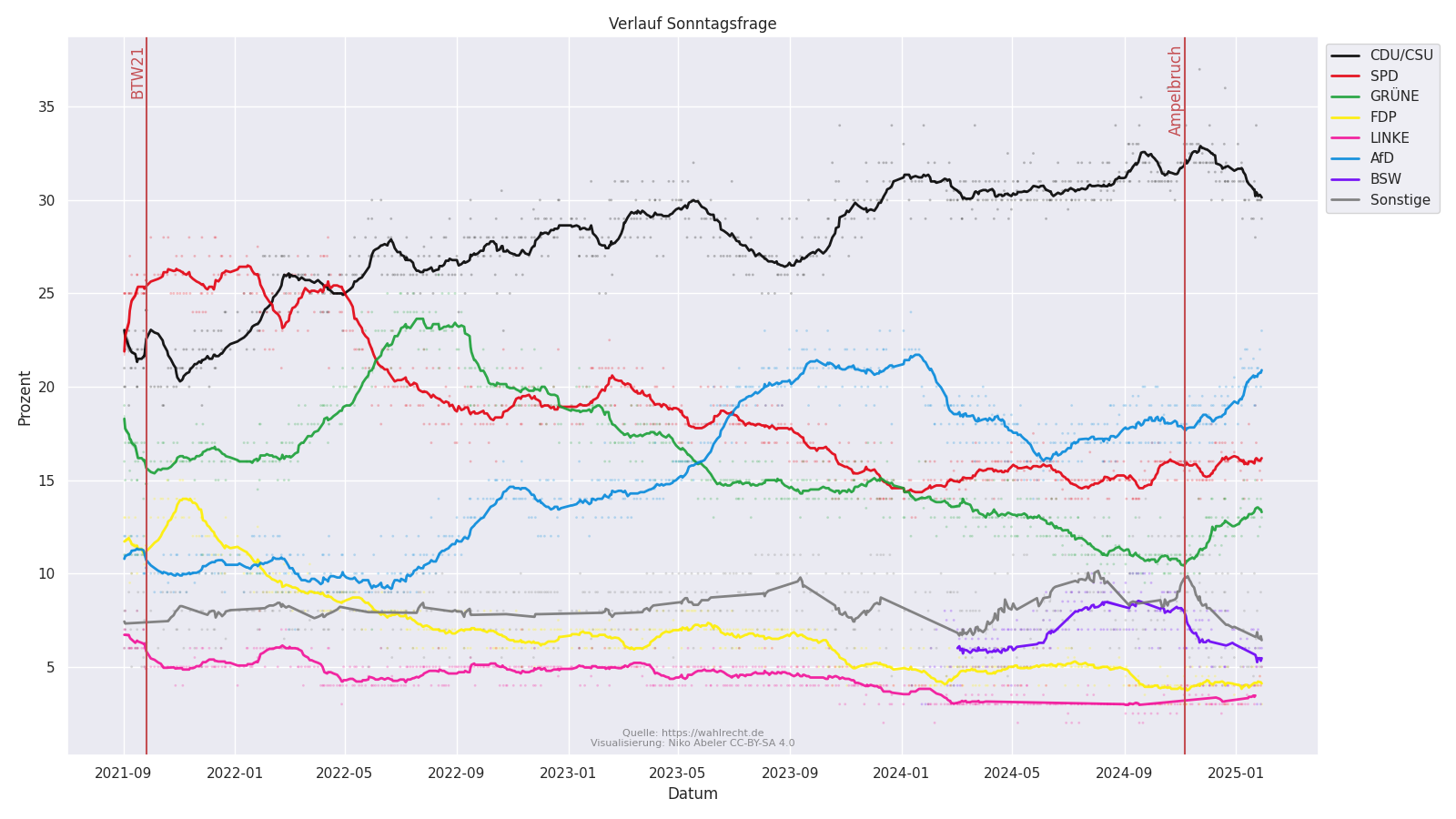
Mit der anstehenden Bundestagswahl 2025 habe ich mich mal einen Abend hingesetzt um den Verlauf der Umfrageergebnisse zu visualisieren. Die Daten stammen von https://wahlrecht.de.
Punkte zeigen einzelne Erhebungen, die Linie ist der Durchschnitt der letzten 14 Befragungen. Die Daten aller Institute wurde genutzt. Bei der "Gesellschaft für Markt- und Sozialforschung" habe ich die Sonstigen und BSW verworfen, da diese zusammen in einer Spalte aufgelistet wurden.
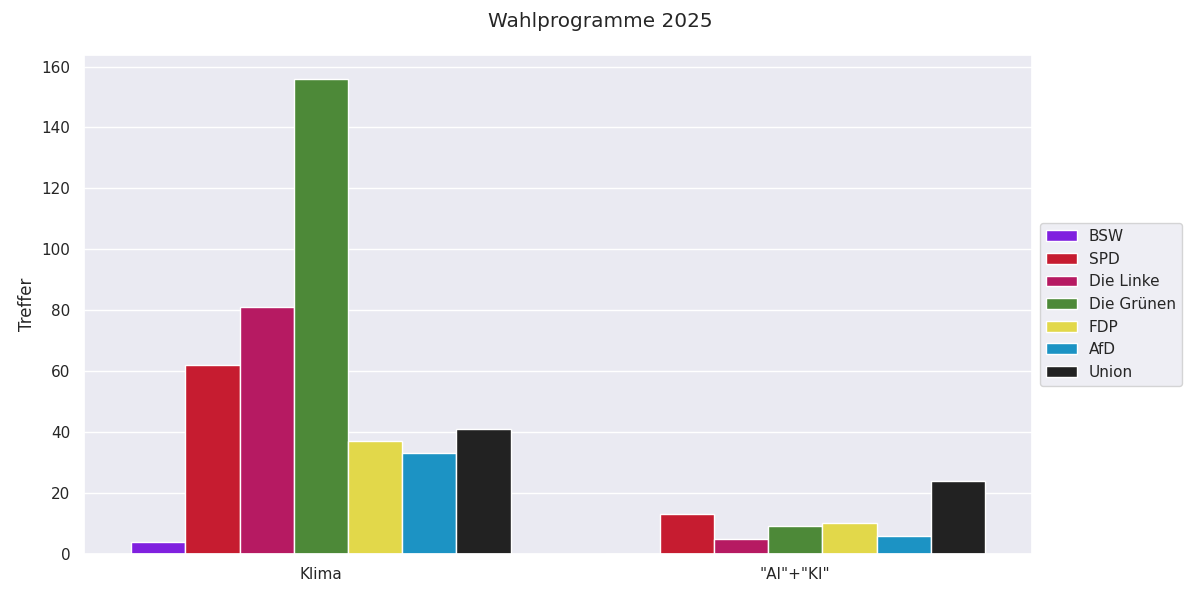
Mit der anstehenden Wahl wurde es Zeit die neuen Programme einzupflegen. Derzeit sind die meisten Programme nur Entwürfe, lediglich die Union hat schon ein fertiges Wahlprogramm.
I've worked on some smaller features and improvements for owl-blogs.
Main Features:
Lists and Tags now have RSS Feeds.
Nicer 404 Pages
For development I took the time to setup the "end-to-end" tests using go test instead of the previous pytest setup. This vastly simplifies testing and its much quicker.
For my DungeonPlanner project I wanted to use custom icons for the tool buttons. Unfortunately the documentation for this is rather slim. As an additional constraint, the image data should be embedded in the binary as I like to compile and ship a single binary file (as long as this is possible).
The nearest approach I could find was to create buttons with downloaded images. The snippet is for GTK3 so it had to be adjusted for GTK4, but it contained the right function names to know what to search for :).
This is the final code I ended up with:
let button = Button::new();
let bytes = include_bytes!("../../assets/icons/add_chamber.png");
let g_bytes = glib::Bytes::from(&bytes.to_vec());
let stream = MemoryInputStream::from_bytes(&g_bytes);
let pixbuf = Pixbuf::from_stream(&stream, Cancellable::NONE).unwrap();
let texture = Texture::for_pixbuf(&pixbuf);
let image = Image::from_paintable(Some(&texture));
button.set_child(Some(&image));
We start by creating a button. Instead of using the ButtonBuilder as you would normally do, I'm just creating an "empty" button. It should be possible to still use the builder, as we are just replacing the child content at the end.
let button = Button::new();
Next we need to load our image data. As I want my images to be embedded in the binary I use the include_bytes! macro. The raw bytes are then turned into a glib:Bytes struct and finally into a MemoryInputStream. The stream is needed to parse the image data.
let bytes = include_bytes!("../../assets/icons/add_chamber.png");
let g_bytes = glib::Bytes::from(&bytes.to_vec());
let stream = MemoryInputStream::from_bytes(&g_bytes);
The next goal is to create an Image object containing our embedded image. With GTK 4.6 we could still use Image::from_pixbuf but this will be deprecated in GTK 4.12. Instead we have to do an extra step and create a Texture and use Image::from_paintable. The texture can simply be created from a Pixbuf, which is created by using the Pixbuf::from_stream function
let pixbuf = Pixbuf::from_stream(&stream, Cancellable::NONE).unwrap();
let texture = Texture::for_pixbuf(&pixbuf);
let image = Image::from_paintable(Some(&texture));
Finally we can set the child of our button to the image and our icon button is done. The same approach also works for ToggleButton.